Wednesday, February 20, 2008

Disable System Tray Icons on Windows XP / Vista

A simple trick to disable system tray icons on Windows XP / Vista, if you never use windows system tray icons to fast access windows application, you might consider disable the entire system tray icons on your computer desktop. Plus more you will feel too many system tray icons does look kinda ugly especially if a lot of icons are visible in the system tray.

So , this disable system tray icons trick will help you hide or disable system tray icons in no time with simple windows registry hack.

STEP TO DISABLE / HIDE SYSTEM TRAY ICON ON WINDOWS XP / VISTA:

Disable System Tray Icons on Windows XP / Vista

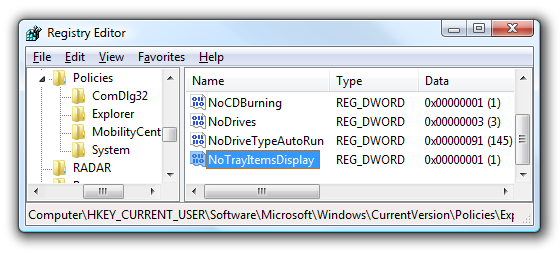
* Open up regedit.exe on Run box option.
* Navigate down to following registry key : HKEY_CURRENT_USERSoftwareMicrosoftWindowsCurrentVersionPoliciesExplorer

Tuesday, February 19, 2008

Free Kaspersky Anti Virus License Key for 1 Year

Free Kaspersky Anti virus license key is now giving away. After AVG anti virus professional and Webroot Spysweeper giving free one year license key campaign, Kaspersky also doing same promotion giving their anti license key for free for china kaspersky forum member. Through this kaspersky free anti virus license key, you can save $39.95 from your pocket and also get to use one of the best antivirus program.

I noticed this free kaspersky anti virus license post on Raymond.cc which allow you Get Free 1 Year Kaspersky Anti Virus Genuine License. However, this free license key campaign site is under chinese wording. But once again thanks to Raymond translate the pages and help everyone get a free 1 year license key.

Meanwhile, you can use the Google Translate to translate the page for us to easily register as a member.

STEP TO GET FREE KASPERSKY ANTI-VIRUS SERIAL NUMBER FOR 1 YEAR:

1. Go to China Kaspersky forum registration page.

2. Scroll right to the bottom of the page and click the left button to join china kaspersky forum.

Agree to sign up kaspersky china forum to get a free kaspersky license key or serial number
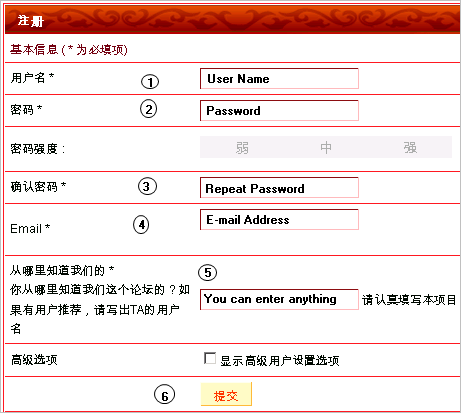
3. Fill up the china kaspersky forum registration form .
Fill up kaspersky china forum to get free kaspersky anti virus license key

4. Once you’ve submitted the form, you’ll see a page like the picture below. Click the link and it will bring you to http://klserver.kaba365.com/
get free kaspersky serial number

5. Enter your e-mail address, select any one from the drop down box and click the red color button.

enter details to get kav free license key and serial number

6. you will receive an email ( inbox or junk mail ) from kaba365 how to get the free kaspersky anti virus license key. The email inside contains a link that will generate a 1 year Kaspersky Anti-Virus serial number for you.  kaba365 will generate free kaspersky anti virus license key for member

7. Then You get a free 1 year genuine Kaspersky Anti-Virus serial number from kaba365 get free kaspersky license key from kaba365

8. Download and install Kaspersky Anti-Virus 7.0 on your computer. Then activate it using the free kaspersky anti virus license that obtain

Activate free kaspersky anti virus license

So, Hope this free kaspersky anti virus serial trick can protect your computer from viruses for the whole year.

Download Free Music from Social Music Services using Free MusicZilla

Free Music Zilla , an online music grabber application that allow you download music from popular social music websites such as Mog, Imeem, Last.fm, Pandora, Myspace, iJigg, Radio.blog.club and many others social music services. Actually Free Music Zilla perform as online music grabber application that monitor and download the music content streaming through your web browser. All you need to do is to mark the file and click on download. The supported browser will be IE, Firefox, Opera, Maxthon, Avnta, Netscape!

Beside that, the best part of Music Zilla is that it’s is a free music grabber application and pretty simple to use. Plus more the file size of free Music Zilla is small.

TUTORIAL HOW TO DOWNLOAD FREE MUSIC FROM SOCIAL MUSIC SERVICES:

* Install and Run FreeMusicZilla
* Visit any music social services
* Choose and play the song you want to download.
* This is important, you MUST keep the song played on the background in order FreeMusicZilla be able to grab the song.
* After FreeMusicZilla grabs the song, select the song, and click download.
* You MUST click download before the leech count down to zero.
* Then, you will get the flv version of the song. ( You can convert online at the flv free music file to mp3 format at flv2mp3 .)

Download Free Music from Social Music Services using Free MusicZillaThe only disadvantages of Free music zilla online music grabber is the automatic music file naming which any free music track you download will have a string of numbers for a name, so you'll have to tag and rename music files on your own.

Meanwhile, using Free Music Zilla to download streaming audio as free music might be illegal on some online music services. However, it would be safe use Free Music Zilla to download public domain music or songs licensed under Creative Commons.

DOWNLOAD FREE MUSIC ZILLA
Windows XP ReadyBoost give More Memory and load faster on XP

eBoostr, a Windows XP ReadyBoost technology that similar functionality like Vista ReadyBoost. As we know that Windows ReadyBoost is a disk caching technology that helps make your operating system and application load faster by using flash memory for caching.

But now, you can use eBoostr to perform windows ReadyBoost on xp platform and make use of XP's prefetch data to cache files on a faster flash drive. Beside that, eBoostr Windows XP ReadyBoost is more advance than Vista ReadyBoost which it can support up to four flash devices perform ReadyBoost technology to speed up your computer system. Plus more eBoostr Windows XP ReadyBoost can increase amount of computer memory and make more applications can be run simultaneously without any PC hardware upgrading

eboostr windows XP readyboost

Perhaps you can grab eBoostr Windows XP ReadyBoost trial first to boost up your xp platform performance. i think eBoostr is an efficient, money-saving and is technically the most simple solution to the problem of insufficient RAM or slow hard disks. Meanwhile, the trial version has no time expiration and you can evaluate it for as long as you wish but it only boosts your system for 4 hours from boot up. or or you can get the full version for just $29.

SYSTEM REQUIREMENTS 0F EBOOSTR WINDOWS XP READYBOOST

* Windows XP (32 and 64 bit support), Windows 2000 , Windows 2003
* USB 2.0 port version or memory card reader
* Flash drive or memory card with at least 2.5 MB/sec random read speed

Download eBoostr Free Trial

Visit eBoostr official pages

Download Vista Services Pack 1 RTM leaked

After several Vista Services pack 1 beta version released. Microsoft has confirmed release Windows Vista Service Pack 1 (RTM) version download via Microsoft update around mid of March. The latest vista service pack 1 will be release in five set of languages (English, French, Spanish, German and Japanese). Plus more, the new Windows vista SP 1 RTM build version will be 6001.18000. This vista SP 1 build information has been confirmed by Paul Thurrott who somehow got his hands over Vista SP1 RTM version and show some Windows vista services pack 1 RTM screenshot.

Download Windows Vista Service Pack 1 RTM

Beside that, i notice that the major torrent site also offer download Windows Vista Pack 1 RTM  via torrent network too. Which the entire vista services pack 1 RTM file size is  434.46 MB in size only. Of course, it’s illegal to download Vista Services Pack 1 RTM from torrent sites, but if you already own a copy of Vista, then it’s probably not-so-illegal to download SP1 through BitTorrent.

Via Windows Vista Service Pack 1 in the Wild at Neowin.net

View more : screenshot of Windows Vista Services Pack 1 RTM 

Create Online Live Chat Room Using XHTML Chat

A simple tutorial to create online live chat room for your website using XHTML Chat. The best part of this online live chat room script is using Ajax technology to auto update chat message without refresh web browser pages. Apart XHTML Chat being online live chat room,

XHTML CHAT CAN USE AS:

* An advanced comment function for blogs offering immediate communication between users.
* An advanced shoutbox.
* A live single/multi-user publishing system.
* A XHTML Broadcasting tool for live coverage of events.

ONLINE LIVE CHAT ROOM TUTORIAL CAN BE IMPLEMENT AS BELOW STEP :

* Download XHTML Chat Script Zip files and then extract XHTML chat zip files on a folder.
* Search for the DB.php files on zipped folder and enter MYSQL server , Mysql User , password and address of the database server.
* After modify mysql database information, upload the entire xhtml chat files to web server directory.
* Then navigate web address initialize chat database. ( Example : http://yourwebaddress/initdb.php )
* After initialize the chat database, the online live chat room is ready to use with the web address of your web server directory already.

Noted : The entire online chat room implement is putting the correct mysql information on db.php files. Then the rest of the implementation will be easy.

Sample of online live chat room screenshot:

Online Live Chat Room Using XHTML Chat

XHTML Chat this online live chat room including XHTML, CSS, Javascript, PHP, all images ,is licensed under a Creative Commons License as well. Which the online live chat room script is freely to use for private and commercial purpose. Hope you enjoy the live chat room tutorial and implement your own live chat room.

Saturday, January 12, 2008

Flexible steel arm for hands-free calling, 1948

This was how hand-free calling worked, according to the September, 1948 ish of Popular Mechanics:


Holding the telephone ready for use, a “third hand” of flexible steel leaves both the operator’s hands free to take notes during phone conversations. The spring arm holds the receiver to the ear and can be adjusted to the height and position of the user. The third hand was developed in Australia.


Link


source